

Jump to a section8
If you’re into hip-hop and pop music, you’ve heard the “808 bass” before: that kick sound with a “THUMP” followed by a long sub-tail. Here’s how to build one from scratch, what actually counts as an 808 (and what doesn’t), and when it’s totally fine to use sample packs.
The History of the 808 Bass
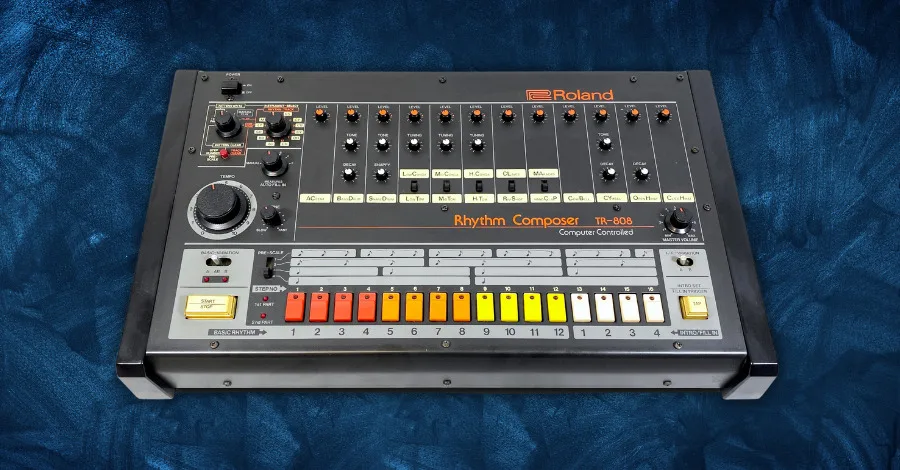
The term “808” refers to the iconic Roland TR-808 drum machine, created in 1980. It solved a major problem for 80s producers: getting a perfect low-end. The TR-808 was initially a commercial failure, but it developed a cult following and eventually appeared on more hit records than any other drum machine.
What is NOT Considered an 808 Bass
An 808 is characterized by a punch sound followed by a decaying sub-bass. A kick layered with a sustain sub-bass is not an 808. A “Reese” bass, which has no kick punch and is a low-detuned sub with width and pulsation, is also not an 808.
How to Create an 808 Bass: Fundamentals
The fundamental component of an 808 bass is a sine wave. Any synth you have that can generate one will work. In the Hyperbits Masterclass, we teach our students to work in stock synths, Serum, and Omnisphere (to name a few).
But for simplicity, we will focus on making one in Serum by Xfer Records.
When picking your synth, make sure it has these key functions on the sound as a whole:
- Attack
- Decay
- Sustain
- Release
- Waveform Generators
- LFO
- Filter
When making your 808 sounds, it is also helpful to keep in mind some key guiding principles:
- Create as much of the sound in the synth as possible. Don’t rely heavily on post-processing, as this will save CPU. You will also be able to save this as a preset later.
- Generally, keep your bass mono below 120 Hz for mono compatibility. Some FX widen your bass unintentionally, so keep this in mind.
Pro Tip: Don’t forget to experiment! This article will serve as your starting point but keep trying out new things.
How to Create an 808 Bass: Using Serum
Generating the Sound
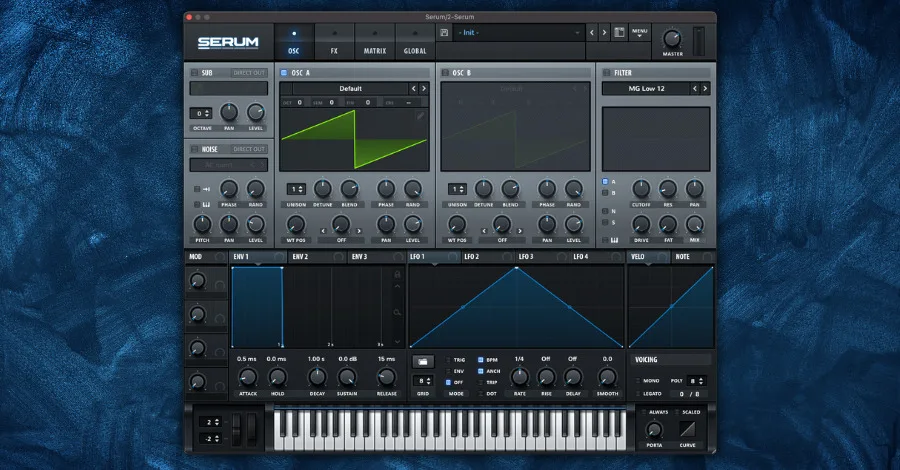
The most common way to make an 808 is to use a sine wave. But here, we’re going to make one using a square wave. This approach gives us more harmonics right off the bat to play with.
First, open Serum and make sure you have the “init” patch open (this is the default for most people). Then click the “mono” button at the bottom right corner of the window.

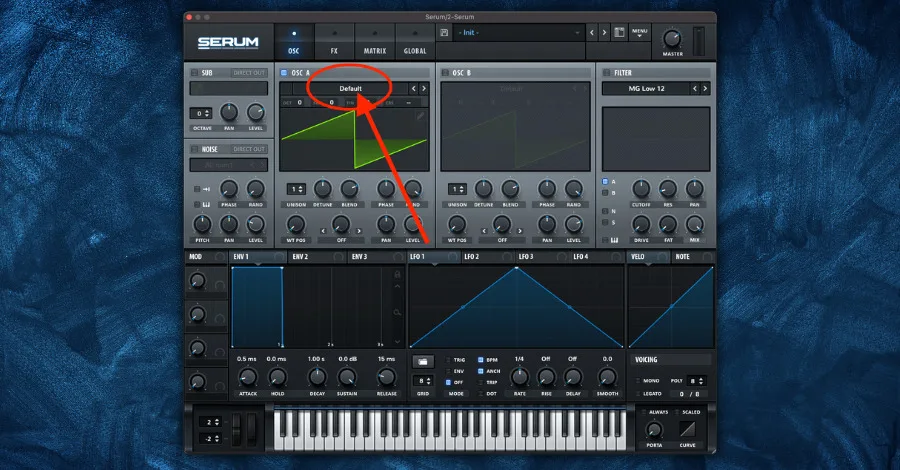
Under OSC A, click where it says “Default.” Hover your mouse over the “Analog” category, and in the menu that appears, click “Basic Shapes.”
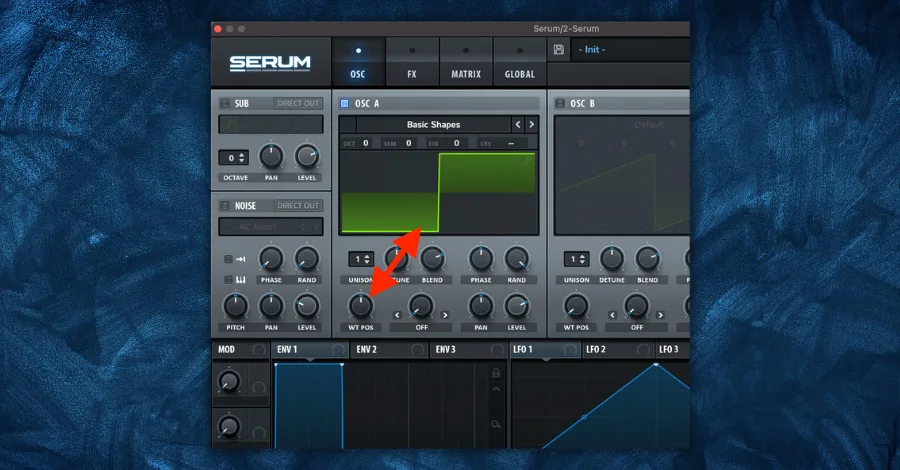
Turn the WT POS knob of OSC A until the square wave appears. This should be when the knob is turned to the twelve-o-clock position. Then set the OCT of OSC A to -2.
The last step is to turn the filter on. Turn the filter module (located on the right side of the window) on and set it to the “MG Low 24” mode. You can leave all the knobs in their default settings or turn the cutoff knob to 300 Hz for a deeper sound.

You now have created the foundation of your 808 bass sound.
The THUMP
Now, we need to make the punch/thump of the 808. This is generated using an envelope to modulate the pitch.
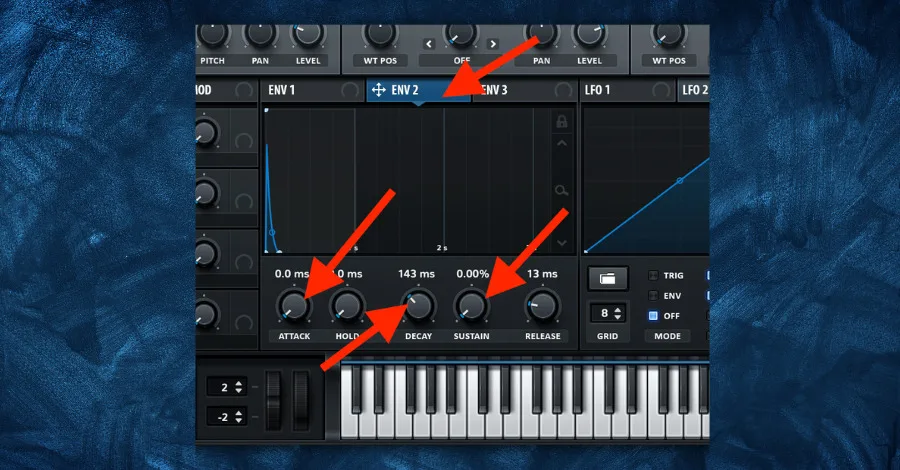
Click on “ENV 2” and turn the ATTACK knob to the left (0.0 ms), turn the SUSTAIN knob to the left (0%), and turn the DECAY knob to about 143 ms.
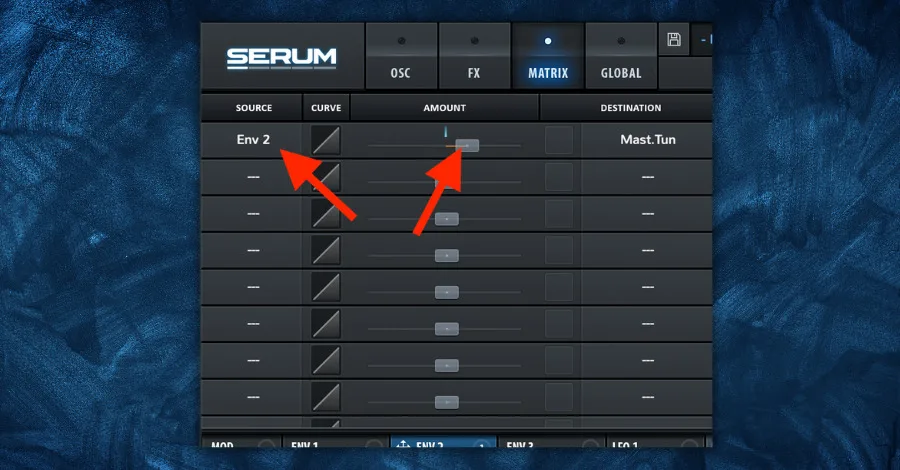
Now look to the top of the Serum window and click the large button that says “MATRIX.” On the first line, click the dashed lines under the column header that says “DESTINATION.” This will bring up a dropdown.
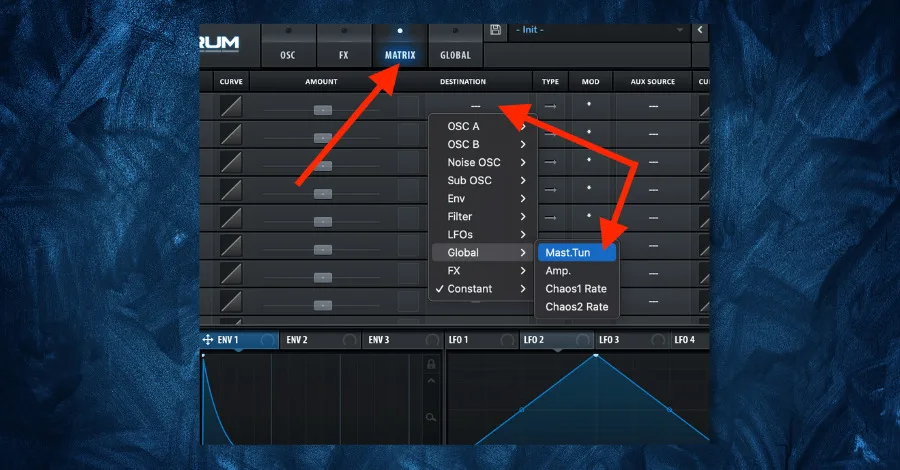
Under the dropdown, go to the “Global” category and click “Mast.Tun.” This will control the master tuning/pitch of the 808 sound.
Now set the “Source” to “Env 2” and begin to move the “AMOUNT” slider to the right. Experiment with the positioning of the slider to get the right punch you desire.
The last step is to Link ENV 2 to the filter’s cutoff. Click and drag the crossed arrows icon next to “ENV 2” and drop it on the filter’s cutoff. Click and hold the blue headphone-looking icon and drag your mouse up and down to adjust the range of the envelope’s effect.
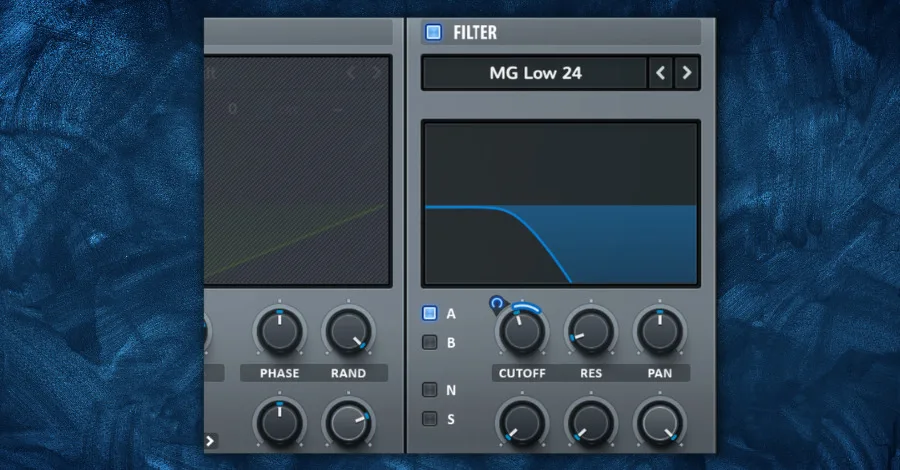
Play around with the ranges. This can let more high frequencies through and give your kick more attack.
You now have the punch of your 808 bass. I encourage you to play around with all of these parameters to learn how they work and to customize your sound to how you like it.
Decay/Sustain/Release
The last key part of the 808 bass is the decaying tail. This step is easy but requires a few extra things to keep in mind.
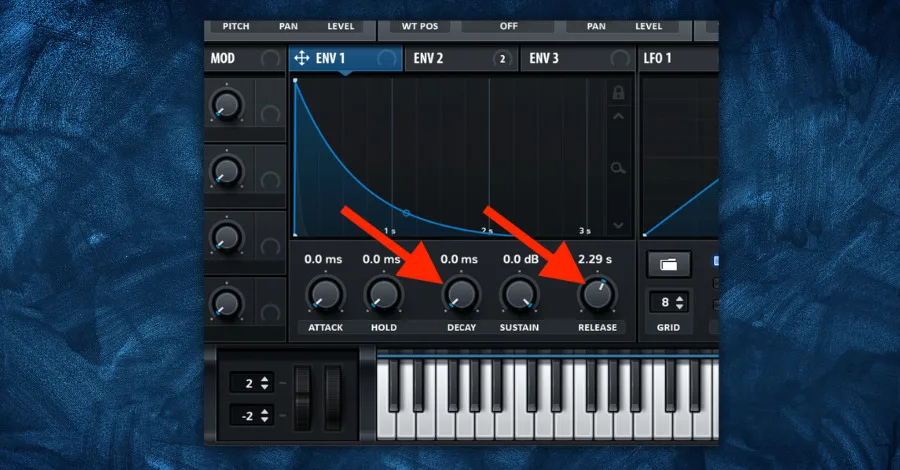
To start, click on “ENV 1.” This controls the overall shape of the sound coming from your patch. Set the “Release” to about 2.29s.
Lastly, adjust the DECAY knob to the left (0.0 ms).
Note: The time setting of your release will vary based on your song’s BPM and style. Adjust this knob to taste accordingly.
Now we have to journey into the midi notes of your DAW. Since the decay and release controls are set the way they are here in this patch, the length of your midi notes matters.
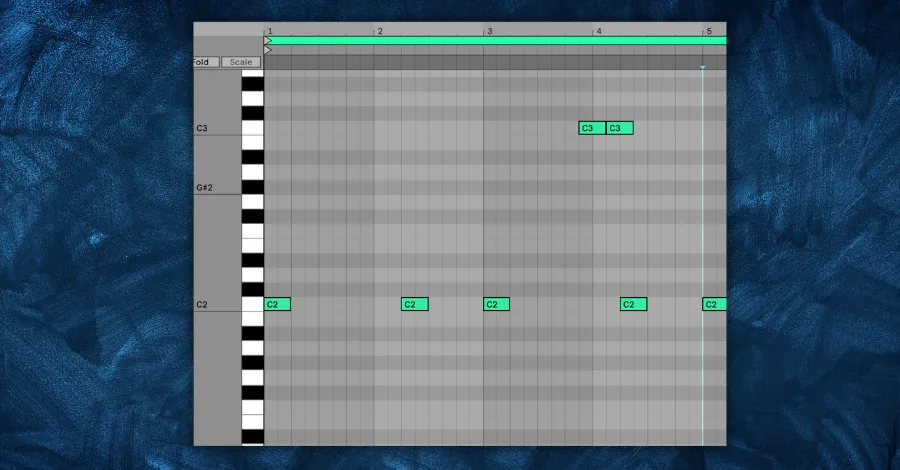
When you are programming your midi notes, keep them all the same length (ex. Quarter notes). Then, adjust the release knob in Serum to achieve the 808 bass length you want.
Keep in mind that the length of your midi notes controls the sustain of your 808.
Adding Class to your 808 Bass
Now it’s time to add your own flavor to your 808. The first thing you can do is experiment with changing the knob settings and other parameters in the Serum patch. Next, try some of these in the following sections.
Adding Noise
If you ever want to give your 808 some top end or even a nice ‘sizzle’ to it, this is what you should reach for. It’s super easy too.
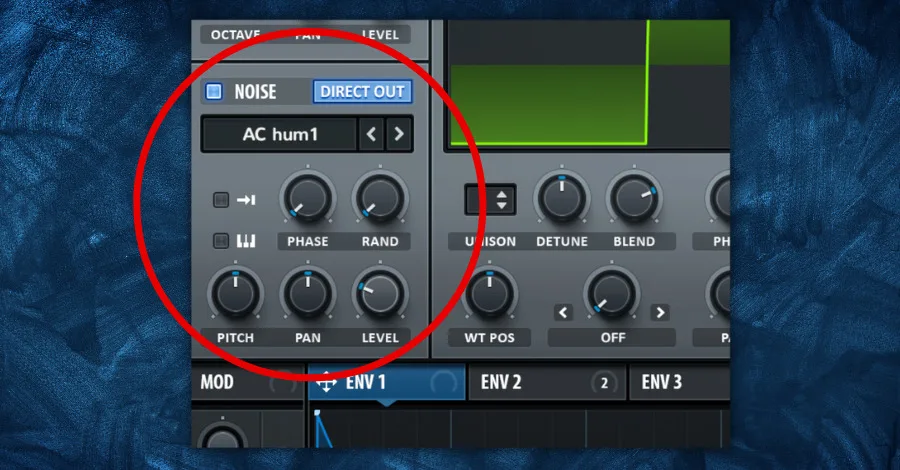
Turn on the noise generator in Serum. The kind of noise you use is up to you, but we can use the “AC hum 1” for now. Make sure the “DIRECT OUT” button is illuminated. Lastly, adjust the level of the noise.
Now you have some crispy top end to your 808 bass.
Distortion/Saturation
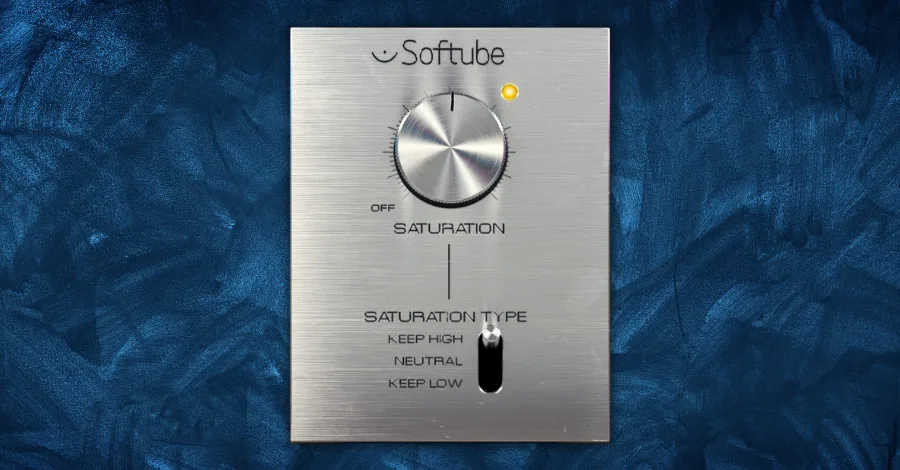
A simple way to add more taste and presence to an 808 is by adding distortion or saturation. Softube Saturator Knob is a free VST that adds some great spice to your sound.
Here’s a breakdown of how saturation works and why it makes such a difference on 808s and other bass sounds.
The difference between an 808 with and without saturation is huge. Give it a try in your current project.
Layer a Kick Sample
Sometimes your 808 needs a little more punch. Rather than spend a lot of time trying to tweak the Serum patch, you can layer a punchy sample with it.
Pro Tip: Many punchy kick samples have a sub-tail of their own. Make sure to filter this out with an EQ or volume automation like a fade.
Using 808 Sample Packs and Presets
There are people on the internet that tend to shame people for using presets and sample packs. We’re here to put that to rest. It’s OK to use samples! Even when it comes to 808s.
Professionals use samples and presets. Why? Because pros care about creating great results. If that means using samples, then great!
Creating 808 bass sounds can be time-consuming. When inspiration is pumping through you, you don’t want to waste that platinum-quality creative energy tweaking knobs. Get that idea out ASAP!
Here are our top 3 favorite sample packs with 808 bass sounds in them:
- Cymatics Diamonds III - Hip Hop Sample Pack
- SURGE Sounds 808 Vol. 1
- LANDR Tape 808
What About Processing 808s Outside of a Synth?
At the end of the day, creating a perfect 808 sub-bass is a matter of personal preference and the style of music you are making. However, here are some general tips on how to create a powerful and impactful 808 sub-bass via processing chains outside of Serum or your chosen synth.
Get a great sample. The packs above will get you some great samples, but keep an eye out for a classic 808 sample from the Roland TR-808 drum machine. These are specifically known for their deep and punchy attitude, so using a sample of its original bass sound will ensure that your sub-bass has the right character from the get go.
Make sure to add distortion. Distortion can help to add warmth and character to your 808 sub-bass, making it sound more powerful and impactful. Experiment with different types of distortion and find the one that works best for your track. But generally speaking, I like to use Sound Toys Decapitator, hit the punish button (which adds 20 DB of distortion), and then tame the original sound by using the dry/wet knob.
Use EQ to sculpt the sound. EQ is a powerful tool for shaping your sub-bass. Use a low pass filter to remove unnecessary high-frequency content, and boost around 60-80 Hz to make the bass sound more powerful. Make sure to do reductive EQ after saturation or distortion, otherwise the frequencies you just cut might get added back in.
Keep in mind that your 808 needs to be audible on all types of speakers. Test on your iPhone speaker to make sure you’re keeping enough low mids, mid-range, and even hi-mids to cut through the mix.
Layer your 808 with a kick (don’t forget to sidechain). Sidechain compression creates a “pumping” effect in your sub-bass that helps it cut through the mix. Layering a kick into your 808 gets you an aggressive transient without fighting the sub.
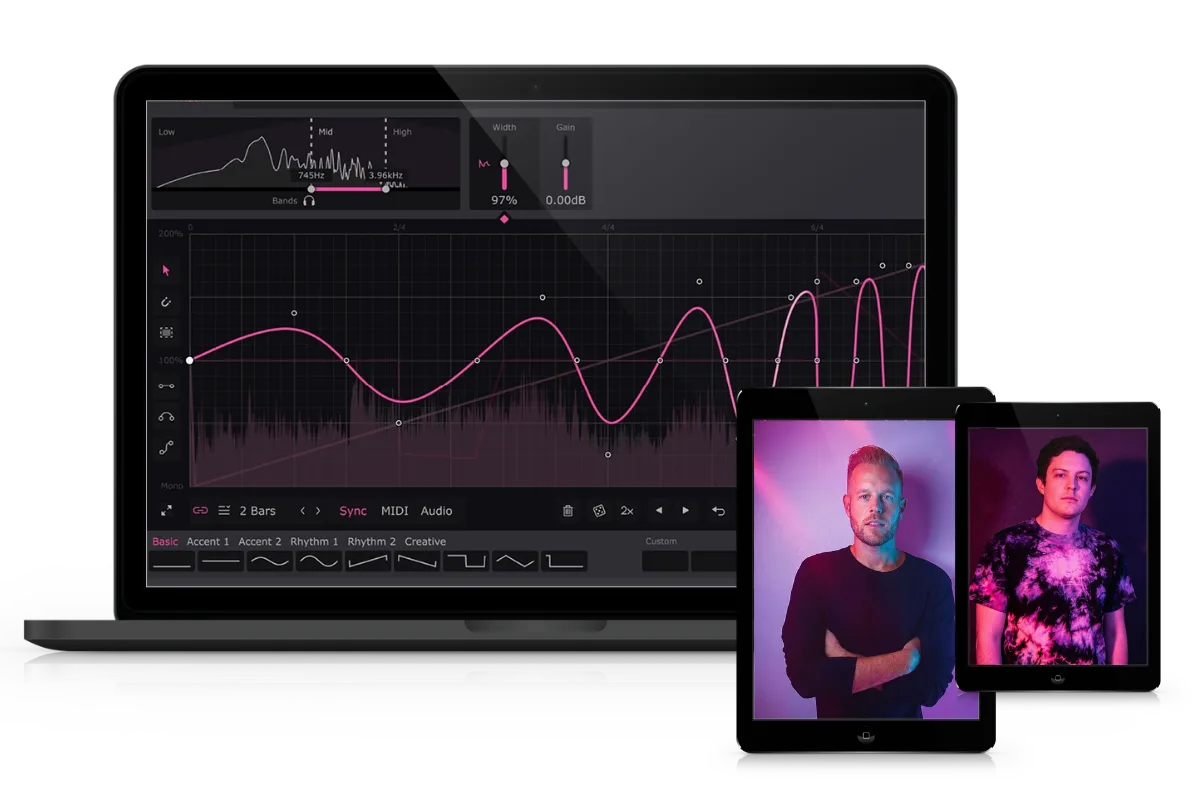
For this, I like to use LFO Tool, Kickstart 2, or Volume Shaper 4 because you can sidechain against the kick and visually set the response to perfectly match the initial hit. Make sure the low of your kick isn’t fighting for space with your 808. Keep in mind the sidechain settings will differ based on tempo and genre, so always adjust according to your kick and the style you’re making.
For a deep dive on the technique, check out our complete guide to sidechain compression.
LFO Tool is one of the best sidechaining tools out there, and this walkthrough covers 10 tricks you probably haven’t tried yet.
Add automation to make it dynamic. Automation can help to make your sub bass more dynamic and interesting. Experiment with automating the volume, the filter cutoff, or other parameters to create a sense of movement and interest over time. At the very least, use volume automation in a way that a real drummer would use. Keep things different, keep things moving, and your low end will be the opposite of dead, dull, flat and boring.
Remember that these are general tips, and the way you use them will depend on the style of music you are making and your personal preferences. It’s important to experiment and find the sound that works best for you.
Save the Patch and Keep Iterating
Congrats! You are now equipped with the knowledge to create your own 808 bass sounds.
Next, create your first 808 preset using what you learned here. Make sure to save it to your “favorites” folder and then experiment.
When you make an iteration of the 808 that you vibe with, save the patch. Keep doing this until you come up with a group of patches that you can reach for on your next track. Over time, keep tweaking your bass as you get better at producing. As your skills improve, so will your 808.
Good luck and happy beat-making!
Related tool: Hyperbits Mighty: 40 house bass Serum presets with analog filter movement and custom macro controls.