
Jump to a section5
You’ve likely heard of the mysterious concept known as a reference track. Maybe you’re already using reference tracks in your music, or perhaps it’s something you haven’t gotten around to trying out yet.
Let me be clear: reference tracks instantly make your music better.
And: reference tracks do not hinder your creativity.
A reference track is a song from another artist you use as a benchmark for elements in your own work. You might match your master’s loudness or your arrangement to a reference.
Used correctly, reference tracks don’t compromise creativity or result in unoriginal work. Instead, they let you position your music against the best ideas out there. They help to:
- Ensure your mixdowns hold up against your target artist’s.
- Eliminate the stress of arranging by providing a road map to structure your music.
- Provide creative benchmarks that will help you write professional musical ideas without having to start from a completely blank canvas.
Below, I’ll take you through the WHY, WHAT, HOW, and the WHEN of reference tracks.
Why Should I Be Using Reference Tracks?
Picasso once stated, “Art is Theft.” All producers are artists, and your work does not exist in a void, it’s okay to borrow from others.
Producers sharing the same genre niche are in conversation with each other. When one makes a distinctive sound, others try to copy it. When a whole genre decides to make their music louder, everyone else is forced to follow suit (have you heard of the loudness war?).
The purpose of using reference tracks is to avoid reinventing the wheel with every single song you produce.
There are plenty of arrangements for future bass, dubstep, house, and techno that we know work really well. When we hear the clarity and precision of professional mixdowns, we know that this is the bullseye we must aim for in our own work.
To make a forward-thinking, creative piece of music, you don’t need a mixdown that is better than everyone else’s, AND a totally unique arrangement, AND never-heard-before sound design, AND a clear master. All you need is to measure up to the best music out there, and then do one or two things different.
After all, isn’t that what both Picasso and Bowie did? The only difference is that they did it the right way.
If you want to see this in action before reading the full breakdown, here’s Serik walking through the exact referencing methods that changed how he approaches every production.
Now let’s break down exactly what to reference and how to do it for each part of your music.
What Is A Reference Track?
Your musical ideas, sound design, arrangement, mixing, and mastering can all benefit from a solid reference track. Here is how I use reference tracks for each of these five core elements.
Musical Ideas
Here’s a secret: virtually every chord progression, bass line, and melody has been done before. You’ve seen the videos of pop songs all using the same four chords.
Even if you come up with something unique, you’re probably copying someone unknowingly. So why not intentionally borrow from music you love?
Find a song with a chord progression or idea that resonates, recreate it in your DAW, then tweak it, invert chords, transpose notes. Now it’s yours.
For example, I referenced the chord progression from Bonobo’s “Cirrus”. I found the chords on Chordify.net and remade them in the piano roll.
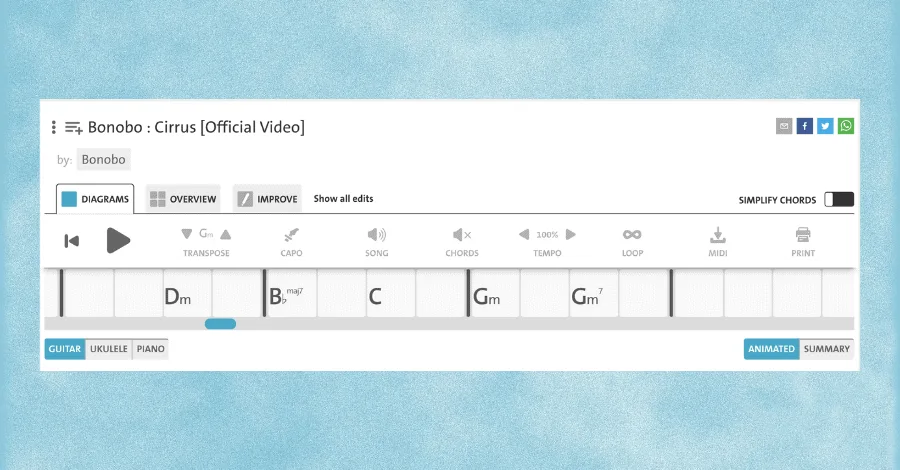
A bit of transposition, tempo tweaking, extra notes, and chord inversions made it entirely new.
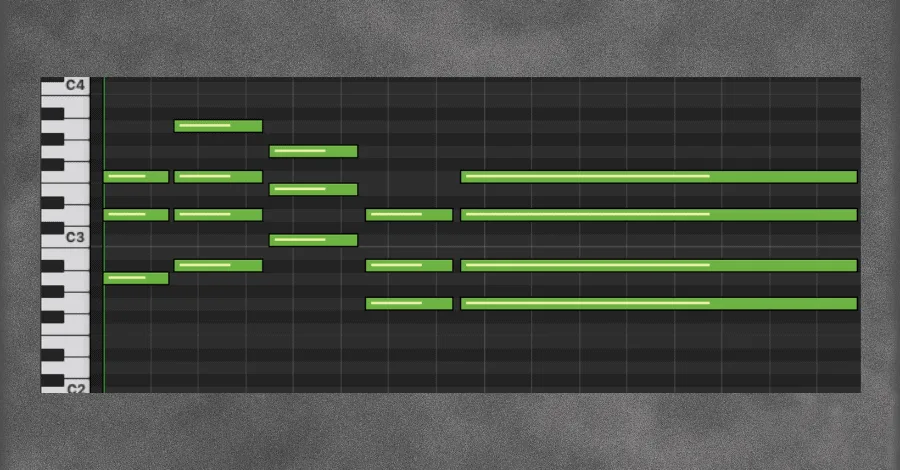
Listen to the remake of the chords in the piano roll:
And here’s how a touch of transposition, tempo adjustments, additional notes, and a few inversions creates something entirely different:
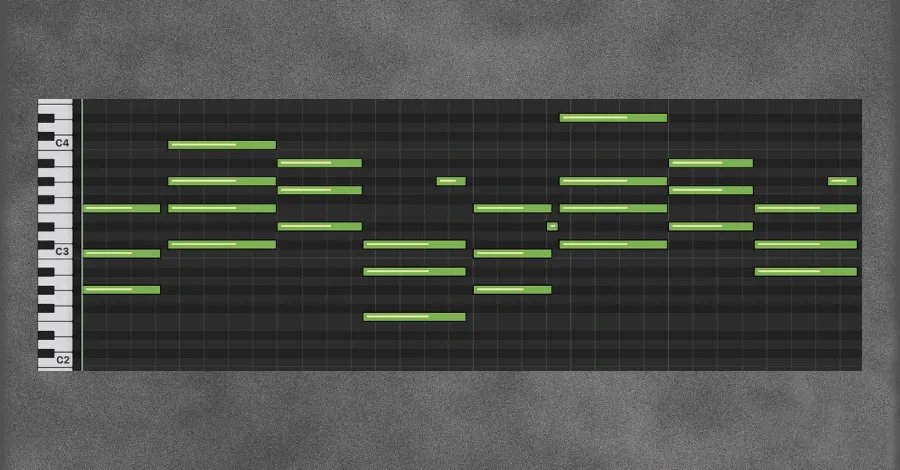
Listen here to the same chords after transformation:
Pro Tip: Use different reference tracks for different parts. Borrow a chord progression from one song, a melody from another, a drum groove from a third. Your sound comes from how you blend and transform borrowed ideas.
The secret is to only borrow small pieces from a variety of songs. Your sound comes from the unique way you blend ideas, and how you choose to transform what you’ve borrowed.
Sound Design
This is straightforward. Artists release soundbanks and sample packs specifically for reuse. Take advantage of them.
Add sounds and samples from packs to your palette and tweak them to make them yours. Electronic music is built on this principle. In house and techno’s early days, everyone used the same synths and drum machines. Acid house was built around a single sound, the Roland 303.
Arrangement
This is where the magic happens. Here’s your assignment:
- Find a song with a fantastic arrangement that never gets boring.
- Create a spreadsheet in Excel or Google Docs.
- In the first row, list numbers by multiples of 4: 1, 5, 9, 13, etc. (these are bars).
- In the first column, list every sound you hear.
- Fill in the grid for each 4-bar section where each sound appears.
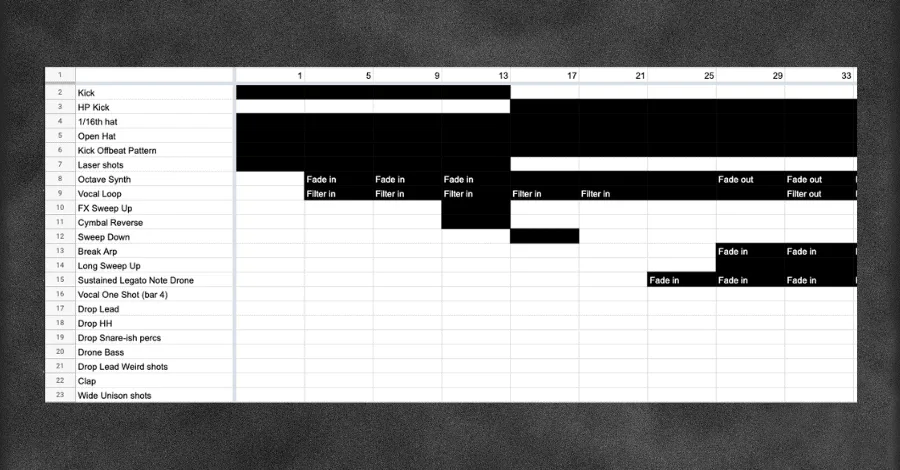
You’ve now created an “arrangement map” of your reference. Move elements in your song to match it. Match drum structure, buildup lengths, breakdowns. You’ll spot what’s missing from your track.
Mixing
Reference tracks are most commonly used to match sonic characteristics. Pick a track with an awesome mixdown and try to match yours to it.
Import the song into your DAW and route it to a bus called “REFERENCE.” Route all other tracks to a bus called “MIX.” Match volumes by ear (loudness meters can mislead because reference tracks are mastered with compressed dynamics).
Now A/B your track against the reference:
- How loud are the kick and low end?
- How are drums panned?
- How bright are synths and vocals?
- How wide are the FX?
At minimum, match your gain staging to the reference before touching anything else.
Mastering
Similar to mixing. Reset your reference to full volume (0dB) and master your track to match.
Consider:
- How loud is the reference? Put a LUFS meter on the master and compare levels.
- How wide is the reference? Get more width in your mix if needed.
- Does your kick survive the limiter in the sub range?
- How do your breakdowns compare after your master chain?
Match your master to the reference and you’re close to commercially viable music.
How To Choose The Reference Track

Picking references is an art. The key: use multiple reference tracks, not one.
If you reference musical ideas, sound design, arrangement, mix, and master all from the same song, you’ll end up copying it. Don’t do that.
Use different reference tracks for each category: musical ideas, sound design, arrangement, mixing (can combine with mastering). Choose references for single, strong elements. A song doesn’t need a perfect mixdown to reference its sound design. It doesn’t need great chords if the master sounds huge.
Pick references for their singular strengths, not overall quality. Choose multiple for each of your songs.
When to Import a Reference Track
The choice to bring a reference into your DAW or not depends entirely on what you’re referencing.
Musical Ideas: No. Recreate the MIDI without importing. Chordify.net, Ultimate-Guitar.com, and 911tabs.com have chord info for virtually everything.
Sound Design: Yes. Loop the section you want to remake. Map the solo feature to a hotkey for efficiency.
Arrangement: Yes and no. Bring it into your DAW, but in a separate project. Loop each 4-bar section while mapping.
Mixing and Mastering: Yes. Import and set up your bus routing as described above.
Once you know what you’re referencing, the setup takes less than five minutes. The results last the entire session.
Start Using Reference Tracks Now
My music transformed once I started referencing. After working with hundreds of Masterclass students, I always see an immediate quality jump once they start.
Two things to remember:
- Use multiple reference tracks. Different ones for musical ideas, sound design, arrangement, and mixing/mastering. Use several for each step if you want.
- Buy the reference track. Support the artist and you’ll get high-quality files for detailed referencing. A dollar spent on a WAV from Beatport is worth it.
Once you start using reference tracks, you won’t go back. That’s not a sales pitch, it’s just what happens every single time.