


Jump to a section9
ReFX Nexus 4 is a powerhouse of a virtual instrument. It’s a VST “ROMpler” that comes packed with 800+ sounds out of the box that fit a wide range of music styles. In addition, its friendly internal librarian helps you find the right sounds quickly for your needs.
ReFX Nexus 4 fits the bill for any skill level from beginner to expert.
What the Heck is a ROMpler??
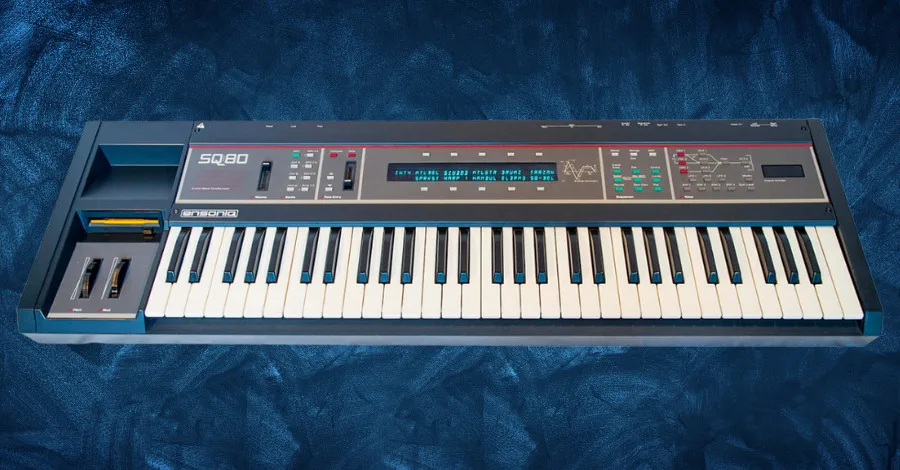
ROMplers have been widely used in music production since the 1990s. And many popular keyboard workstations and software synthesizers are based on this technology.
A ROMpler (AKA a sample playback synthesizer) is an electronic musical instrument that uses pre-recorded audio samples of real instruments stored in read-only memory (ROM) to create sounds.
In addition, ROMplers combine a synthesizer with the samples to generate added realism to the sampled sounds. With this tool, you can produce realistic instrument sounds without recording them yourself.
Traditional synthesizers generate sounds using oscillators and filters. ROMplers use digital samples and synths, played back at different pitches and speeds, to produce different notes and articulations.
As a result, ROMplers usually come with a large library of samples intricately organized into categories such as pianos, guitars, drums. And orchestral instruments. The samples are typically stored in ROM memory. This means they cannot be edited or replaced by the user.
Unique Features
As a ROMpler, ReFX Nexus 4 is already unique at its foundation. Yet, it’s packed with features that make it stand out over other VSTs like Serum.
Advanced Librarian
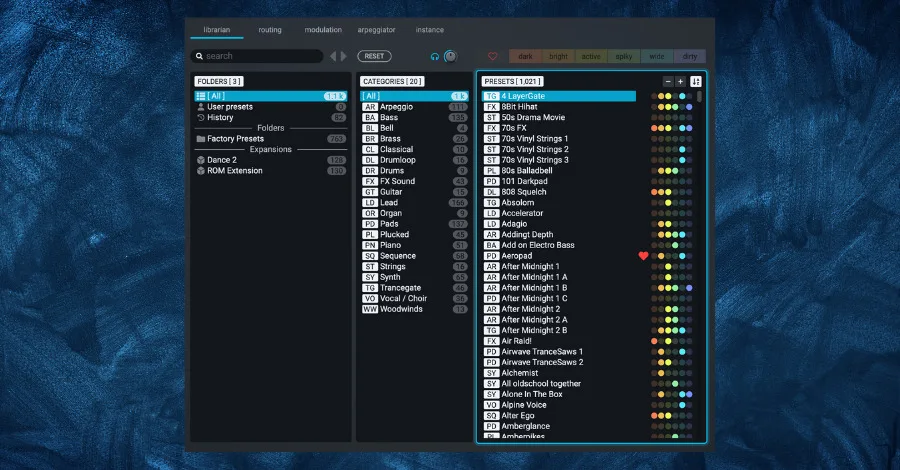
The preset browser (called the “Advanced Librarian”) is neatly organized into three main columns. Each preset is sorted by category and vibe/character so you can pin down your ideal sounds more quickly.
Ever browse a pack of presets and come across something that sounds great but isn’t quite there yet? So you move to a different pack to see if you can find something “better.” A large handful of presets later, you realize that one preset you found 2-3 packs ago was the “one.”
But you’re kicking yourself because you were in a flow state and didn’t write down the preset’s name.
Lucky for you, Nexus 4 keeps a history of your browsing adventures. And you can trace your steps back to your preset soulmate.
Arpeggiator Deluxe
A huge, unique feature of ReFX Nexus 4 is its monster multi-layer arpeggiator. This crazy feature lets you combine up to 16 layers of different arpeggios and create complex melodic patterns inside the VST.
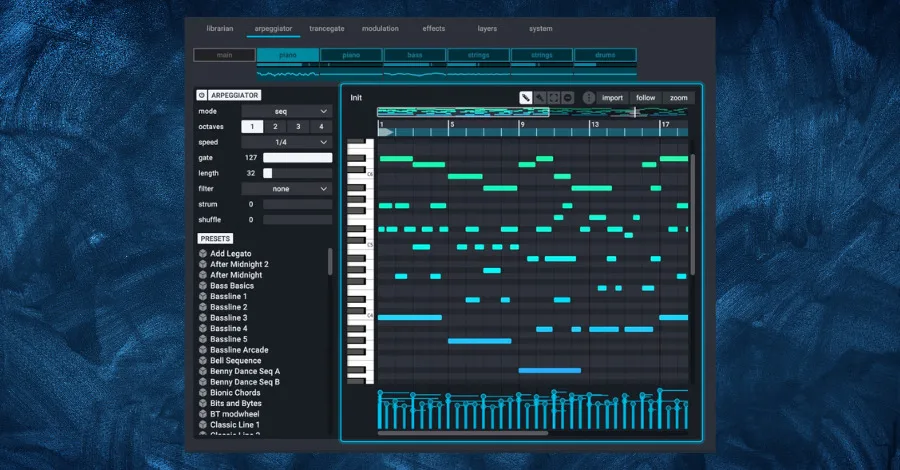
You can zoom in and out and create patterns up to 256 steps. Editing the arpeggios is easy and seamless too.
Pro Tip: Layer two different Nexus arpeggio patterns at different octave ranges to create a sense of movement and depth without touching a single automation lane.
Supercharged Signal-Flow
Nexus 4 is a visual-friendly plugin. While some VSTs require you to think a little harder about the signal flow through the software, Nexus lays everything out in an organized flow chart.
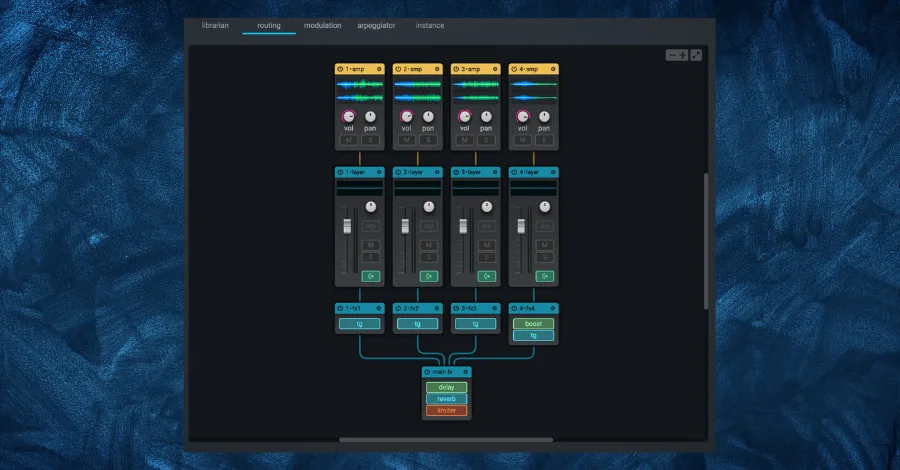
Fully visual, you can quickly and easily edit the signal chain. You can edit oscillators, layers, FX, and more all in one place. No more clicking back and forth.
You can enable/disable entire layers with one click or focus on one module at a time. You can leverage this feature to split sequences into components for better mixing in your song (ex, just the bass layer from a whole sound).
Drawbacks

While ReFX Nexus 4 is a remarkable plugin, it has some downsides.
It’s not a fully-fledged synthesizer and relies on preset sounds and samples. This can make it difficult to customize sounds to fit a specific song. Dependency on presets can also lead to a lack of originality and uniqueness in your music. Some presets sound overprocessed too.
That limitation is fine, though, you can always use post-processing to shape the sound how you want. This is what we teach in the Hyperbits Masterclass: post-processing is where you add your own flavor.
Pro Tip: Run a Nexus preset through a saturation plugin and a short room reverb to make it feel like yours rather than everyone else’s. Even a single stock EQ cut can change the identity of a preset dramatically.
Nexus is pricey. The starting price is $249 and climbs to $4,029 depending on how many presets you want, compared to $189 for Serum.
Nexus is also resource-intensive. One patch runs fine, but stacking multiple Nexus instances requires serious CPU power.
A Brief Tour of ReFX Nexus 4
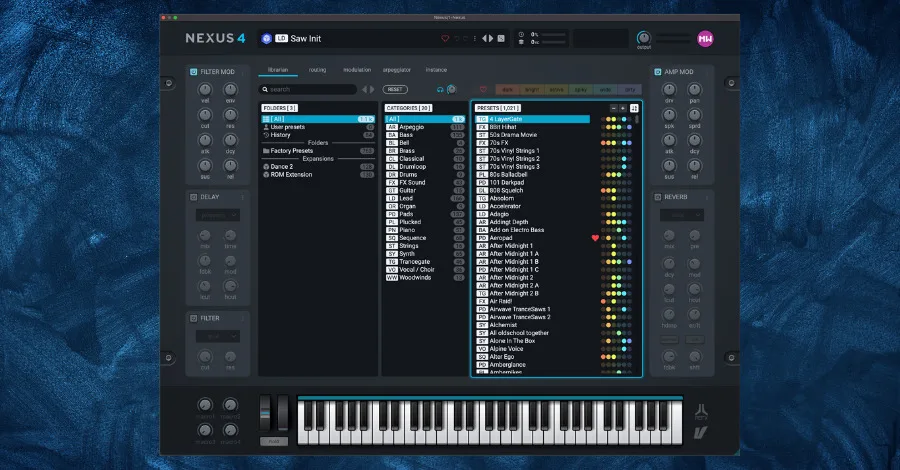
Open Nexus as a plugin in your DAW (digital audio workstation). When Nexus first loads, it will open to the preset browser.
Choose a preset category and subcategory from the menus. As you click or scroll through presets, Nexus will play a sample tone of the preset. Once you find a sound you like, double-click on a preset name to load it.
Macro Knobs
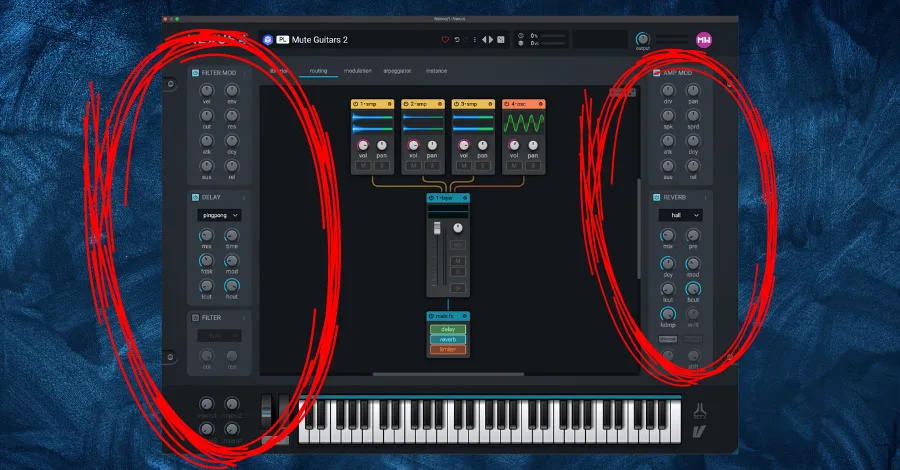
Refx Nexus 4 provides a range of macro knobs that allow you to modify multiple parameters of a sound simultaneously. These macro knobs provide a quick and intuitive way to make changes to the sound without having to dig into the individual parameters.
The features of the macro knobs include:
- Multiple Parameters: Each macro knob can control multiple parameters simultaneously, allowing you to make complex changes to the sound with a single knob.
- Customizable: The macro knobs can be customized to suit the user’s needs, allowing them to assign specific parameters to each knob.
- Easy to Use: The macro knobs are easy to use, making it simple for you to make changes to the sound quickly and efficiently.
However, the macro knobs also have some limitations:
- Limited Control: Depending on the preset being used, the macro knobs may not have control over certain parameters. This can be frustrating, as it may limit your ability to make the desired changes to the sound.
- Limited Sound Design: While the macro knobs are useful for making quick changes to a sound, they may not provide the same level of sound design control as editing individual parameters would.
Modulation Tab
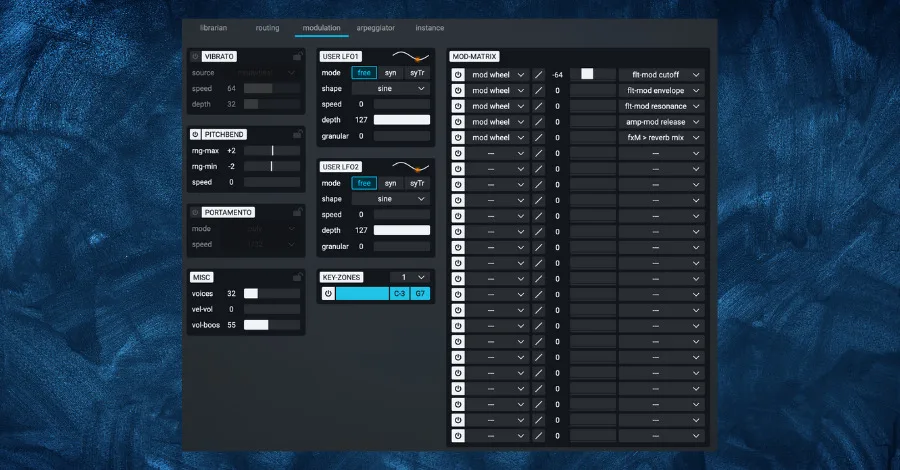
Refx Nexus 4’s modulation tab is a powerful tool for shaping and sculpting sounds by allowing you to create complex modulation routings. It offers a range of modulation sources, destinations. And a modulation matrix that allows you to route and control multiple modulation sources to various parameters.
Modulation Matrix
The modulation matrix allows you to create and edit modulation routings between modulation sources and destinations. The matrix provides a graphical representation of the routings, making it easy for you to see which sources affect which destinations.
Modulation Sources
Refx Nexus 4 offers many modulation sources, including LFOs (Low-Frequency Oscillators), envelopes, step sequencers, and velocity. These sources can be used to modulate various parameters, such as filter cutoff, amplitude, and oscillator pitch.
Modulation Destinations
The modulation destinations include parameters such as filter cutoff, amplitude, oscillator pitch, and effects parameters. These destinations can be modulated by any of the available modulation sources, allowing for complex and nuanced modulation routings.
Intensity
The intensity control determines how much the modulation source affects the destination. Increasing the intensity will produce a more pronounced effect while decreasing it will have the opposite effect.
Polarity
The polarity control determines the direction of the modulation, allowing you to create positive or negative modulation routings. Positive modulation will increase the value of the destination parameter as the modulation source increases, while negative modulation will decrease the value.
Routing Tab
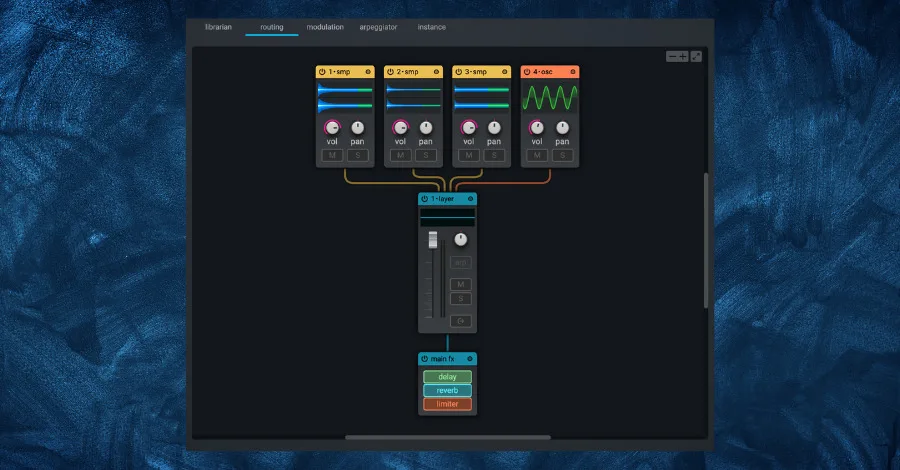
The routing matrix in Refx Nexus 4 is a powerful tool that allows you to route and mix signals within the synthesizer. It’s a flexible and intuitive way to combine multiple sources and destinations, allowing for a variety of sound design possibilities.
The routing matrix is divided into two sections: the sources and the destinations. The sources section contains a range of inputs, such as oscillators, filters, and effects. The destinations section contains the main output, the effects output, and the aux outputs.
Each source and destination has its own row and column in the matrix. And you can simply click on the intersection of a row and column to create a new routing. For example, you can route an oscillator to the main output, or route an effect to an aux output.
One of the great things about this tab is you can create complex routings. For example, send an oscillator to both the main output and an aux output, or create feedback loops by routing a signal back to itself. This creates unique and complex sounds that may not be possible with other synthesizers.
Arpeggiator Tab
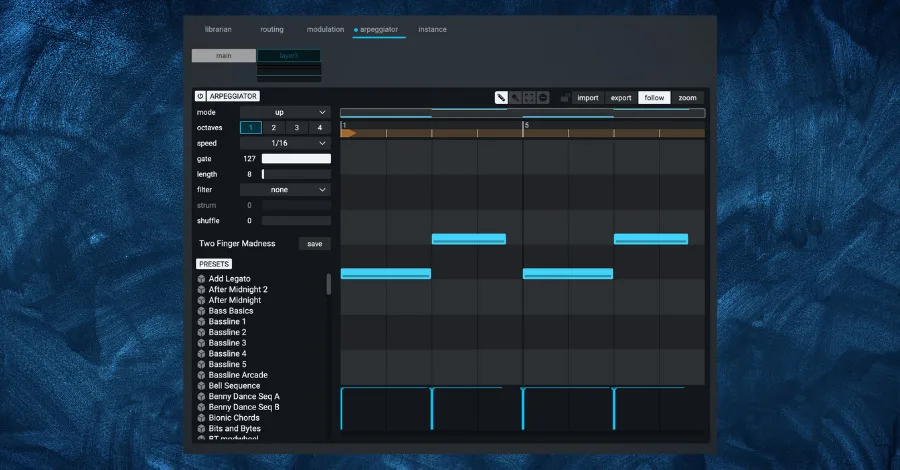
The arpeggiator tab in Refx Nexus 4 is a powerful tool that allows you to create complex arpeggios and patterns. The pattern section allows you to choose from a range of preset patterns or create your own custom patterns. You can also adjust the octave range and the order of the notes in the arpeggio.
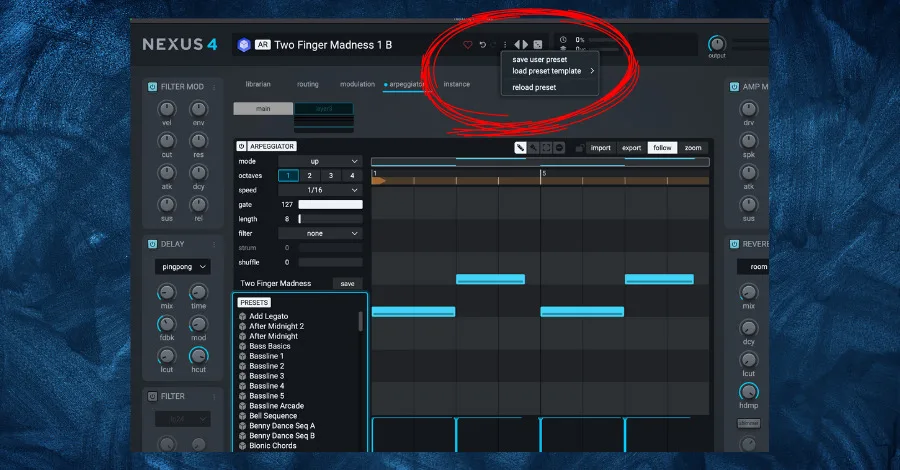
The timing section allows you to control the speed and swing of the arpeggio. The speed can be adjusted for beats per minute (BPM), while the swing control adds a subtle groove to the arpeggio.
One of the key features of the arpeggiator is the ability to sync it to the host tempo. This ensures that the arpeggio stays in time with the rest of the project, making it easier to integrate into a larger composition.
Don’t Forget to Save Your Presets
Once you’ve had fun and settled on a sound you like, you can save your custom sound by clicking the “save” button on the mixer page and choosing a name and location for your file.
My Favorite Feature: Nexus Sequences
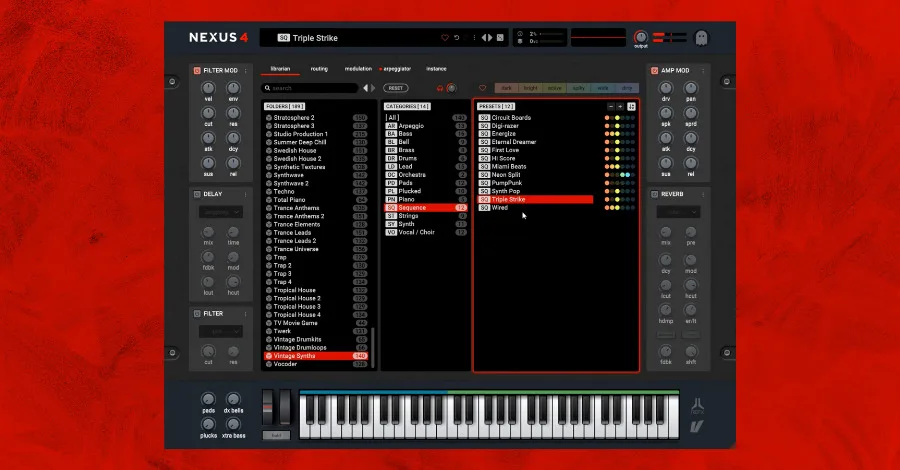
There is a hidden gem inside each Nexus 4 preset pack: sequence presets.
Sequence presets are basically ‘construction kits’ inside presets that have been created using the arpeggiator. You can loop these sequences in key and in time with your track for melodic inspiration or even find intricate drum patterns, hi-hats, percussion, bass lines. And leads.
Each preset pack in Refx Nexus contains a range of sequence presets that have been designed to work with the sounds in that pack. For example, the EDM preset pack contains sequence presets that are geared toward creating rhythmic patterns for EDM tracks. Access these presets by clicking on the sequence tab in the preset browser.
Pro Tip: Use the sequences as a starting point and modify them to create variations. Tweak the sequence length, note velocity, the notes themselves, and other parameters to create new patterns and textures.
If you want to take arpeggiation even further, here’s a breakdown of four different approaches to building arps in electronic music:
The Nexus arpeggiator gives you a serious head start on all four of those approaches, since the sequence presets are basically pre-built arp templates you can modify from the inside out.
Recommended Expansions
Once you master ReFX Nexus, there will come the point where you’ll need to expand your vast library of presets and sounds. These are the top pack expansions for Nexus that we recommend.
Hollywood Piano by ReFX

Hollywood Piano by reFX. Most producers can get by using the stock piano in their DAW. But nothing exerts as much emotion as a lush and high-quality piano. Upgrading from your stock piano is necessary if you want to sound pro. So we recommend this pack from ReFX.
Packed with 32 super high-quality presets that emulate iconic pianos made by Yamaha and Steinway. ReFX has even thrown in some lead, FX, pad, and other sounds into this pack.
Vintage Synths by ReFX
Vintage Synths by reFX. This is our go-to pack when we want to reach for that vintage 70s and 80s sound. Manuel Schleis is the legendary creator behind the 140 sounds contained in this pack. This is the pack to get if you want to embody that retro sound in your music.
Melodic Techno and Techno 2

Melodic Techno and Techno 2 are also worth mentioning. They include over 250+ sounds, arpeggios, basslines, and leads designed to produce melodic techno music.
Related tool: Start to Finish with Anden: Produce a dancefloor-ready melodic techno track from blank session to master, step-by-step with Pete from Anden.
Deep House 1 and 2
Deep House and Deep House 2 are another stellar pair to consider. The sounds inside are laid-back, minimal beats, deep basslines, chilling nature sounds, and melodic pads.
Hollywood Strings 1 and 2

Hollywood Strings and Hollywood Strings 2 are perfect for producers aiming to make movie scores. You’ll have all the cool orchestral sounds you need to create awesome arrangements that can rival those in blockbuster movies.
Think of sensuous strings, bold brasses, and wondrous woodwinds, all at your fingertips. It’s like having a whole arsenal of fantastic sounds to play around with.
Nexus Trap Expansion by Wrecks (free)

Wrecks Nexus Trap Expansions. We are very surprised at the quality of this free pack. Geared towards Trap music, this pack is jammed with a generous 131 presets. Inside are a large variety of sounds, such as pads, plucks, arps, leads, and many, many more. All of which will make your next beat come to life.
Famous Artists Who Use Nexus

While ReFX Nexus isn’t as well known as a synth like Serum or Massive X, Nexus is widely used by many famous artists and producers. Here are a few top artists that currently use Nexus:
- KSHMR
- Tiesto
- Kygo
- Steve Aoki
- Marshmello
- Armin van Buuren
- David Guetta
- Axwell
- Nicky Romero
- Sebastian Ingrosso
- Zedd
- DADA Life
- Afrojack
This list goes on, but it’s clear that Nexus is a power tool tried and trusted by some of the biggest names in the game. Personally, I think its real value lies in very processed and commercially viable sounds, making it easy to use on the fly.
If you’re looking for a synth that doesn’t require much synthesis, editing or manipulation, Nexus is a great starting point.
Nexus 4 Current Pricing
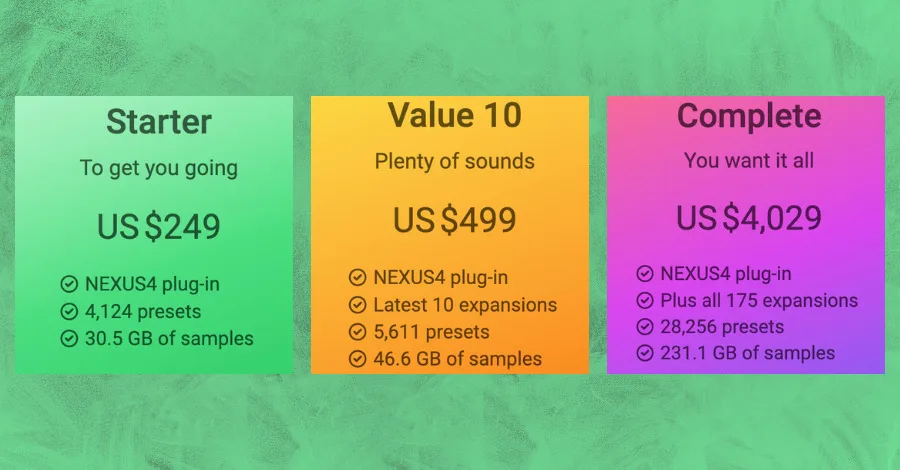
We briefly touched on it before. But ReFX Nexus 4 has a wide range of pricing, depending on how many presets you want coming out of the gate.
The first (and cheapest) option is the “Starter” version. This tier is $249 and comes with the following:
- 4,124 sound presets divided into 26 categories
- 5,380 multi-samples (30.5 GB)
- 215 impulse responses
- 119 arpeggiator-presets
- 52 trance gate presets
From there, the next tier up is the “Value 10” version for $499. This comes with everything in the “Starter” version, plus the following expansion packs:
- Bigtone Signature 4
- Drum and Bass 2
- EDM 8
- Future Rave
- Lo-fi 2
- Melodic Techno
- Slap House 2
- Studio Production 2
- Studio Production 3 Guitars
- Vintage Synths 2
All totaling to 5,611 presets and 46.6 GB of samples.
The highest tier for ReFX Nexus 4 you can get is the “Complete” edition. This pack runs $4,029 but comes with a motherload of sounds. In fact, ReFX gives you their whole collection of expansions (175 packs total) when you purchase this tier.
All totaling 28,256 presets and 231.1 GB of samples.
Is Nexus 4 Worth It?
You’ve learned everything you need to know about ReFX Nexus 4 at this point. Although it’s similar to other VSTs like Serum, it has many unique features and is arguably easier to use, especially when starting out. It’s significantly more powerful than it looks. Although heavily dependent on presets, the sounds it creates are extremely commercial and ready to use, almost as they are.
If you choose to get Nexus 4, I’d recommend browsing through the preset library and picking a sound you like to make your first chord progression or melody. Tweak the sound with the macro controls and the signal flow chart. Continue to experiment and keep exploring all of the sounds that Nexus offers.
All-in-all, have fun while doing it, and you can’t go wrong. Nexus has its drawbacks. But I think it’s a great tool for producers more focused on making music than getting into the specifics of sound design itself.
Heads up: some of the links below are affiliate links. If you buy through one, we earn a small cut (costs you nothing extra). But we'd point you at this exact gear whether we made a dime or not.