
Jump to a section8
What is dithering in music production? When should I use it? What does it even do?
Music production, on the surface, seems to be all about the sounds you make and what you can hear. But it isn’t so apparent that you also need to pay attention to the things you can’t hear well. Dithering is one of those (nearing inaudible) things you need to pay attention to.
I’m going to pull back the curtain on what Dithering is without all of the math and technicalities.
So what (really) is Dithering? Let’s get into it.
What is Dithering?
In plain terms: it’s “good” noise that drowns out “bad” noise created by digital audio conversions. Dithering is intentionally added noise that masks quantization error that occurs when reducing the bit depth of a digital audio file. These errors create noise that is generally unpleasant to listen to. All-in-all, the “bad” noise that Dithering is designed to mitigate.
To demonstrate these concepts better, the next two sections will show ‘exaggerated’ examples of what quantization errors and Dithering are in general.
The “Bad” Noise
The GIF below shows the spectrum of a simple sine wave (generated by Serum) playing at 32-bit:

As you reduce the bit depth, the quantization errors created in the process begin to introduce noise.
In the GIF below, the bit rate of the sine wave has been reduced to 16-bit:

Notice how there appears to be a floor of noise introduced into the audio.
If we reduce the bit depth even further to 10-bit we get the result below:

Notice how noise across the spectrum is now louder and more saturated.
As an extreme example, let’s reduce the bit depth one more time to 5-bit:

The harmonics created by the conversion process are now much more pronounced and are very audible at this point.
The “Good” Noise (Dithering)
Since Dithering’s goal is to mask the “bad” noise, it is mixed into the audio at subtle volumes.
To demonstrate this, I mixed white noise into the 5-bit example above:

Here is the result after the white noise is added:

In some instances, in the example above, the noise actually reduces the amplitude of some of the “bad” noise’s harmonics.
Pro Tip: This is the core principle behind dithering. You’re trading a deterministic, harmonically unpleasant noise for a random, spectrally flat one that your ears handle much better.
What is Bit Depth?
It’s the resolution of each sample of audio. Digital audio dominates the music industry. It’s how most of us consume music today.
Unlike analog audio, digital audio is not a continuous stream of sound. Computers and software have to take “snapshots” of the analog audio as it passes through.
These “snapshots” are called “samples.”
The amount of “snapshots” that are taken over time is called the “sample rate.” For example, 44.1 kHz is 44,100 samples taken per second.
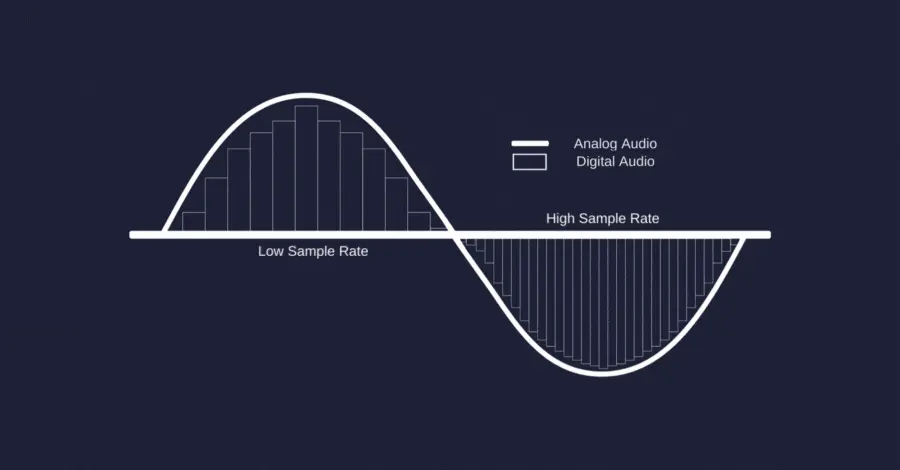
Bit depth is the resolution or number of ‘bits’ in each of those samples.
Just like on TVs or computer monitors, the higher the resolution, the more detail you can see from the content.
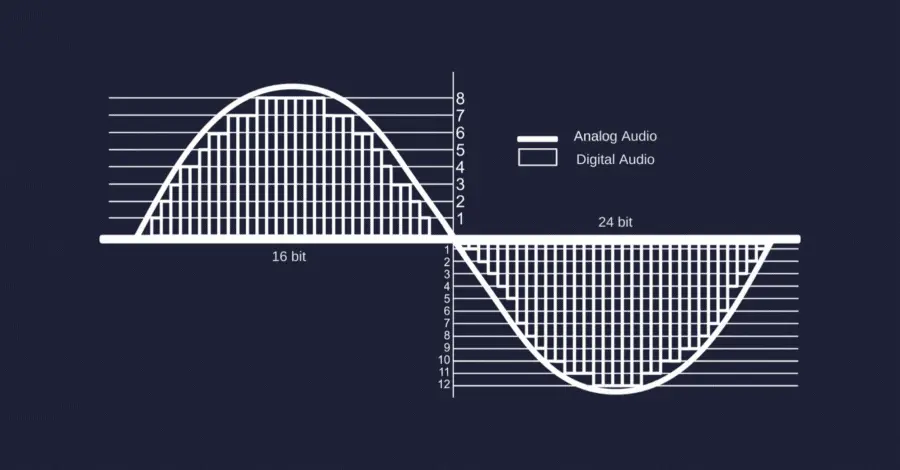
Because digital conversions are not perfect, the process of reducing the bit depth of audio creates errors.
These errors are what are causing the “bad” noise to appear.
When Should I Use Dithering?
Whenever you’re reducing the bit depth of your audio. Typically during the mastering stage. As important as Dithering is, it’s only applied once in the whole production process, at the end.
If Dithering is applied more than once to an audio recording, the noise begins to stack on top of itself and becomes louder. Applying Dithering too many times can drown out the subtle details in the back of your mix and make your music sound “cheap” and low-quality.
Here’s Serik walking through the mastering chain and where dithering fits in the signal flow:
Dithering is the very last thing in the chain. After it, nothing else gets applied.
Which Dithering Option Should I Pick?
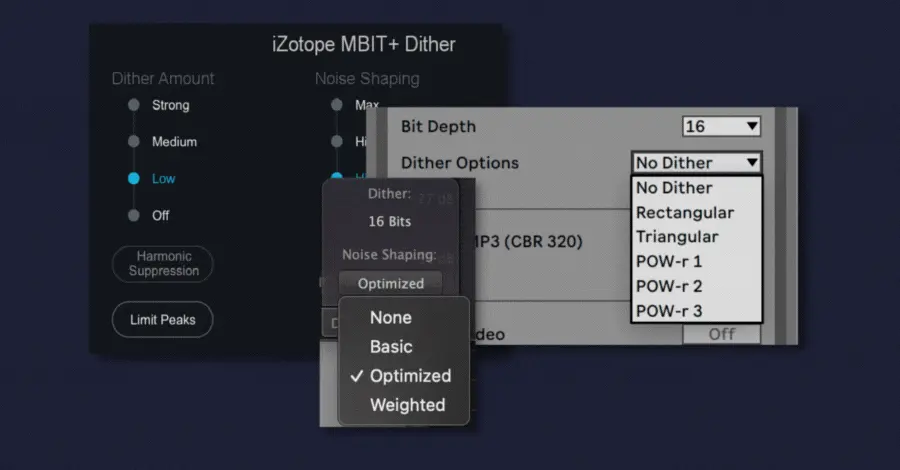
If you’ve made it this far, you’re probably ready to apply dithering to your music. However, all of a sudden, you realize there are different dithering options and shapes.
In most cases, it doesn’t matter which shape you choose. It comes down to personal preferences, but here are the differences so you can make an informed call.
Dithering Examples
Below are tangible examples of the different Dithering options in Ableton. Dithering shapes given in other DAWs and VSTs generally follow similar shapes as Ableton.
I recommend reading the manual of your software to understand its Dithering options further.
Each example is a silent audio that was exported with different Dithering modes applied. The audio was then boosted by 70 dB so you can hear it (and see it) for yourself.
Triangular (Ableton):

You may find this sound familiar. It’s essentially white noise but slightly boosted in the high frequencies.
Rectangular (Ableton):

Look familiar to Triangular? That’s because it essentially is.
You’ll notice in the audio example that it’s just the same noise but louder.
POW-r 1 (Ableton):

POW-r stands for “Psycho-acoustically optimized word-length reduction.”
You’ll notice a drastically different shape here. Some audio compression algorithms focus on high-end information. This Dithering mode helps compensate for that.
POW-r 2 (Ableton):

Like POW-r 1 but with a different shape. This is the shape I tend to reach for.
POW-r 3 (Ableton):
The loudest of the POW-r algorithms, this one was boosted only 60 dB to save your ears. This Dithering shape has a boost in noise applied at 10kHz and a dip at 4kHz-5kHz.
Pro Tip: If you’re unsure which mode to pick, POW-r 2 is a solid default for most electronic music. The noise-shaping pushes energy into frequencies where your ears are least sensitive.
All five modes are valid. The differences are subtle enough that most listeners will never notice. Just pick one and commit.
Now Go Dither Something
Congratulations! You now know more about Dithering than most producers. You also picked up more about bit depth and sample rates along the way.
In the Hyperbits Masterclass, we cover these topics as well as what DAW settings to have to make sure you don’t accidentally introduce the “bad” noise into your production.
As homework, pick a Dithering mode and try it. Export silent audio clips (like I did) with different Dithering modes applied and mix it into your song as a “test” to see which sounds best for you.
Ultimately, your choice is mostly arbitrary, but it’s important to understand the decisions you make in music production.