

Jump to a section10
- How loud should your master be?
- What LUFS actually measures
- How loud are professionally mastered dance tracks?
- Streaming playback levels by platform
- Should you master to -14 LUFS?
- Hear it: the same song at -14 and -7, at the same volume
- How I decide how loud to go
- When your master won’t get as loud as the reference
- Before you bounce
- Frequently asked questions
You finish a master. You play it next to a track you love. You switch back to yours and reach for the volume.
So you Google “how loud should I master my music,” and every site gives you the same answer: -14 LUFS.
Great. A number. Finally, something in music production with a clear answer.
Then you master your dance track to -14, play it next to your references, and it sounds smaller. Three hours of work, and it sounds smaller.
That -14 LUFS figure comes from Spotify’s Normal playback setting. Somewhere along the way it got passed around as mastering advice.
How loud should your master be?
The short answer: loud enough to hold up next to a great reference track in your genre, and no louder than it can go before it starts to sound worse.
On the electronic dance records we make and teach at Hyperbits, I aim for about -6 to -8 LUFS on the drop, depending on the reference. Quieter, more dynamic genres sit a little lower, but don’t master to -14 LUFS just because Spotify plays music there. Spotify only turns a loud master down, so the punch and density your limiter added are still there at -14, while a master made at -14 never had them.
What LUFS actually measures
LUFS stands for Loudness Units relative to Full Scale. It’s one number for how loud a song sounds over time.
That’s different from the peak number on your master fader, which only shows the single loudest instant. Two songs can both peak right under 0 dB and sound nothing alike. One is dense the whole way through. The other is a big kick with a lot of air around it.
Peaks tell you when you’re about to clip. LUFS tells you how loud the song feels to a listener, which is why every streaming service uses it.
Most meters show you three readings:
- Integrated: the average of everything the meter has heard since you last reset it. Play the whole song and you get the whole-song number, which is the one the platforms use. Reset it and play only the drop, and you get the drop’s number.
- Short-term: a rolling window of the last three seconds. It moves constantly, and it’s good for spotting the loudest moment in a section.
- True peak (dBTP): the real highest point of the waveform, including the bits that sneak between samples.
When I say my drop measures -7 LUFS, I mean I reset the meter at the start of the drop and read integrated LUFS at the end. The whole-song number comes out lower, because the intro and the breakdowns pull the average down.
If you want the longer story of how we got here, I wrote it up in the loudness war guide.
How loud are professionally mastered dance tracks?
I measured 63 dance records from my reference folder using the original store downloads. For each track, I measured the loudest 30 seconds and the whole song.
Here are 12 you’ll probably know:
| Track | Drop | Whole song |
|---|---|---|
 Duke Dumont, Clementine Douglas Ain’t Giving Up | -3.9 | -6.3 |
 Martin Garrix & Zedd Follow | -5.0 | -7.4 |
 Porter Robinson Language | -5.2 | -7.8 |
 Lane 8, Le Youth, Jyll I Will Leave a Light On (Sultan + Shepard Remix) | -5.3 | -7.4 |
 Kaskade x John Summit Resonate | -5.6 | -7.1 |
 John Summit x HAYLA Shiver (Cassian Remix) | -5.7 | -7.0 |
 Pryda Allein | -5.8 | -8.1 |
 Zara Larsson x David Guetta On My Love | -5.8 | -8.2 |
 070 Shake x Anyma Black Dress (Anyma Remix) | -6.7 | -8.5 |
 Anyma x CamelPhat The Sign | -6.7 | -7.2 |
 Lane 8 Atlas | -7.8 | -8.6 |
 Tiësto, Dyzen All Right | -8.4 | -10.2 |
All readings in LUFS, from the extended or original mix where there is one, measured with the EBU R128 standard every LUFS meter uses.
I measured all 63. Each dot in the image below is a drop from the records I measured.
- The median drop read -6.6 LUFS. 39 of the 63 sat between -6 and -8.
- 14 were louder than -6, mostly the big crossover records. Duke Dumont’s drop hits -3.9.
- 10 were quieter than -8, mostly melodic and deep records.
- The median whole song read -8.6 LUFS. That lines up with iZotope’s study of Billboard hits, which averaged -8.3. It’s also why the whole-song number undersells how loud a dance drop really is.
Lately, the melodic dance records I pull in as references have been a little quieter than I remember. I haven’t noticed the same change in dubstep or bass house.
Related tool: Mix Master Flow: nine full projects mixed and mastered from start to finish, with the reference checks done on screen.
Streaming playback levels by platform
These figures apply to the whole song. Spotify and SoundCloud publish their levels. For the other services, the source column shows where each estimate came from.
| Platform | Plays music at | Source |
|---|---|---|
 Spotify | -14 LUFS | Spotify’s help page. Premium can pick Loud (-11) or Quiet (-19) |
 SoundCloud | about -14 LUFS | SoundCloud’s help page, with the same mastering advice as Spotify |
 Apple Music | about -16 LUFS | Measured by engineers. Apple’s own guide gives no number |
 YouTube | about -14 LUFS | Measured by engineers. Loud songs go down, quiet ones stay put |
 Tidal | about -14 LUFS | From the researcher who advised Tidal. It levels whole albums |
 Amazon Music | about -14 LUFS | Reported by engineers. Amazon confirms the feature, not a number |
 Deezer | about -15 LUFS | From Deezer staff on its forum in 2019, and not confirmed since |
  Downloads | No change | Beatport, Bandcamp and DJ pools hand over your file untouched |
A few details from Spotify’s page that are worth knowing:
- It turns loud songs down with a volume knob. No compression, no limiting. A song that measures -8 LUFS gets turned down 6 dB and that’s it.
- It only turns quiet songs up as far as their peaks allow. A quiet song with tall peaks stays quieter than everything around it.
- True peak: Spotify suggests keeping it below -1 dB, and below -2 dB if your master is louder than -14 LUFS. Converting to a streaming format can push peaks up and add distortion, and louder masters are more exposed to it.
- Not every listener gets it. Spotify’s web player and a lot of TVs and speakers skip normalization, and listeners can switch it off in the app.
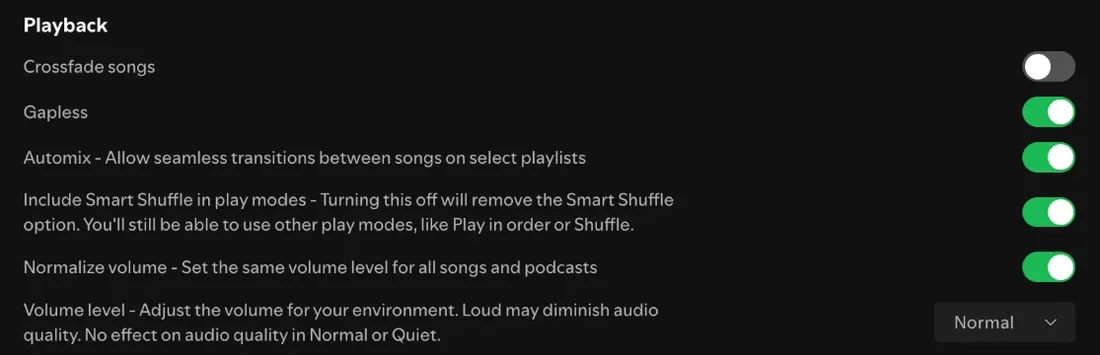
Spotify’s Normalize volume switch, under Settings, Playback. It’s on by default, and Volume level picks -14 (Normal), -11 (Loud) or -19 (Quiet).
SoundCloud’s page says the same thing in almost the same words.
Should you master to -14 LUFS?
For most of the music we teach here, no.
I get the logic, and it sounds smart. “If Spotify is going to turn my master down to -14 anyway, why not deliver at -14 and keep all that punch?”
For jazz, classical and acoustic records, some engineers do exactly that, and it’s a fair call. The dynamics are the whole point of that music.
For dance music, pop and hip-hop, I think it’s a mistake, for two reasons.
Limiting changes the sound, and Spotify’s volume knob doesn’t undo it. When a limiter holds the peaks down, the quiet details come up, the kick and bass lock together, and the mix gets thicker. Turn the limited version down and listen again. The quieter details the limiter brought up are still audible. Most released dance records are made this way, so that thickness is the sound people expect from the genre.
Push the limiter too far and the kick goes soft or the vocal starts to crunch. You’ll still hear that after Spotify turns the track down. How hard you limit is a call about the sound, and you make it by ear, next to your references.
A lot of playback never touches the volume. A DJ who buys your track on Beatport gets the file you uploaded. If your master measures -14 LUFS and the record before it measures -7, that’s about 7 dB to make up with the gain knob. A label A&R opening your WAV hears the level you sent, too.
Hear it: the same song at -14 and -7, at the same volume
Here’s the same mix mastered twice. One is limited lightly to -14 LUFS. The other is pushed to about -7 LUFS, then turned down 7 dB so it plays at -14 too, the same way Spotify would play it.
They play at the same loudness. Switch between the two clips and listen to the front of the kick. Which version hits harder to you?
How I decide how loud to go
Before I touch a limiter, I pick one or two records with the intensity I’m going for and measure their drops. That part takes a few minutes. If your mix falls apart before it gets to the reference’s level, that’s a longer job, and the next section covers it.
1. Put a LUFS meter last on your master, after the limiter, so it reads exactly what you’ll export. Logic has a Loudness Meter built in. Youlean Loudness Meter is free and works in every DAW. Which one you use matters less than sticking with it, because meters read a little differently from each other.
2. Bring the reference into your session. Put it on its own track with its own copy of the same LUFS meter, so you can read it without it going through your limiter. If it plays through your master bus, bypass your mastering chain while you measure it.
3. Line up the loudest sections. Their drop against your drop, or the biggest chorus against yours.
4. Measure the reference’s drop. Reset the meter, play the drop from start to finish, and read the integrated number. That’s the average of exactly what you just played. Then reset and do the same on yours. Don’t compare short-term readings. That window is only three seconds long, so the number depends on the moment you happen to look.
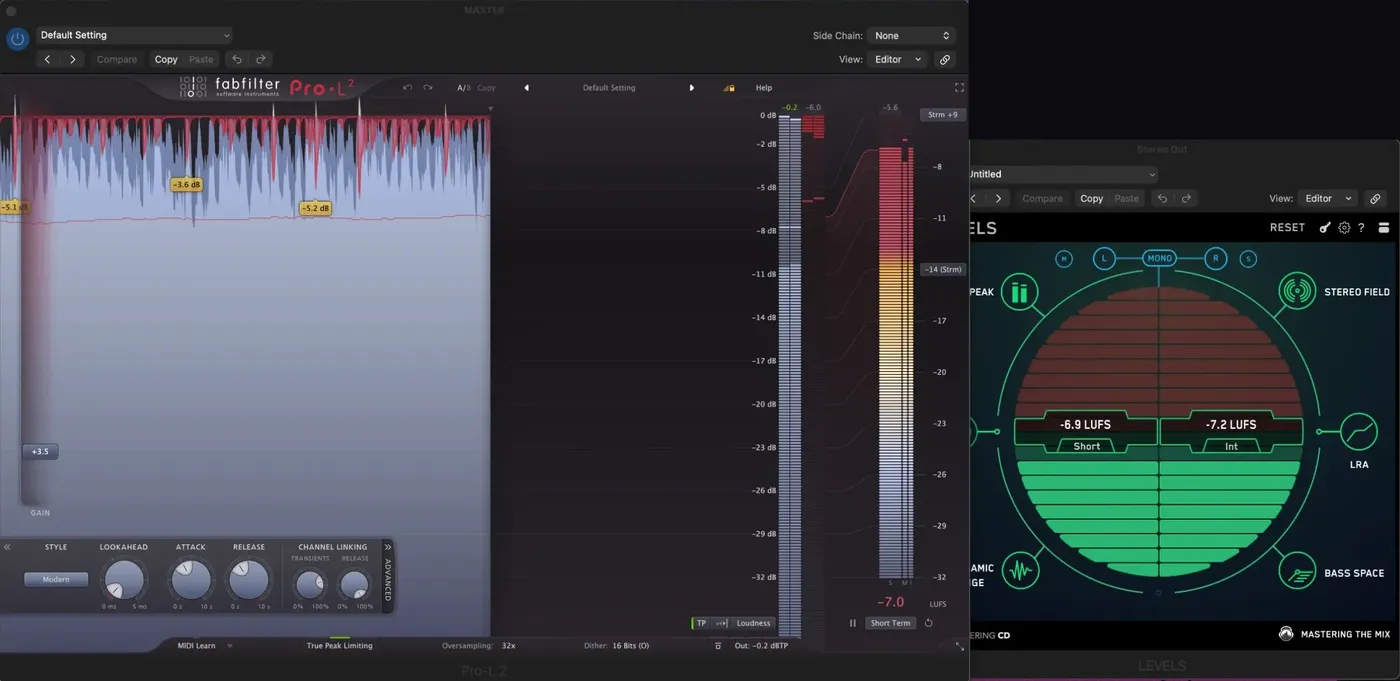
One of my own drops: Pro-L 2 with true peak limiting on and the output at -0.2 dB, and LEVELS reading -7.2 LUFS integrated across the drop. Right in the range of the records above.
5. Close the gap with your limiter, then listen at matched volume. If the reference reads -7 and yours reads -9, push the limiter until you’re close. Now stop looking at the meter. Match the playback volume, then bypass the limiter and listen to the kick again. A lot of limiters have a gain match or unity gain button that does this for you. If the kick loses punch with the limiter on, back off the gain.
6. Set your ceiling. I was taught to set it at -0.2 dB, just under zero so nothing clips, and that’s still where I normally set mine.
The -1 dB advice is newer, and it came in with streaming. When a platform converts your file to a compressed format, the peaks can come out a little higher than they went in. A loud master with its ceiling right under zero can clip after that conversion, even though the WAV never did. So Spotify suggests -1 dB, and -2 dB for a master louder than -14 LUFS, with true peak limiting switched on.
What you give up is level. A -1 dB ceiling makes the file about 0.8 dB quieter than a -0.2 dB one. On Spotify you’ll never hear that difference. In a DJ set or a download, you will. So pick based on where the song will mostly get played.
When you’re comparing a mix (before mastering) to a finished record, flip it around and turn the reference down to your level first. The full routine is in my guide to reference tracks.
And if your song sounds great a dB quieter than the reference, leave it there. Don’t wreck a good master chasing 1 dB that Spotify will take away anyway.
When your master won’t get as loud as the reference
You push the limiter. The reference is still louder. You push more, and now your song sounds flat and crunchy.
Before you try another limiter, watch the gain reduction through one drop. Does it jump on every kick, on one loud snare, or when the lead comes in?
- Too much low end. A sub and a kick fighting over the same space eat your headroom, and the limiter grabs them first.
- Spiky drums. One snare that pokes way above everything else makes the limiter work on every single hit.
- One part that’s just too loud. Usually a lead or a vocal. The whole mix jumps every time it comes in.
- Parts fighting for the same space. Layers that sit in the same range, or add peaks without adding anything you can hear, use up headroom. Fewer layers isn’t automatically louder, but a drop where every layer has its own job is generally easier to master.
Fix those in the mix and the master gets louder on its own, without you strangling the limiter.
This is also where stems help. If the kick is the thing eating your headroom, you can fix the kick and leave everything else alone. That’s the idea behind stem mastering. And if you’re building a chain from scratch, start with how to master a song.
Before you bounce
- Your drop reads close to the reference’s drop, measured the same way.
- The kick still punches with the limiter on. Match the volume first, then flip the limiter off and on.
- Nothing crunches. Loop the loudest few bars and listen to the vocal and the kick.
- Your ceiling is a choice, not a default. -0.2 dB keeps the file as loud as it can be. -1 dB is the safer pick for streaming.
- You listened at a low volume too. Problems hide when it’s loud.
Frequently asked questions
Should I master to -14 LUFS for Spotify?
Only if that’s where the song sounds best, which is common for jazz, classical and acoustic music. For dance, pop and hip-hop, match a reference in your genre.
Will Spotify reject or punish a loud master?
No. It turns the song down with a plain volume change. Spotify does warn that very loud masters can pick up distortion when they’re converted to a streaming format, which is why it suggests a lower true peak for them.
Does Spotify turn up quiet songs?
Yes, but only until the peaks reach about -1 dB. A quiet song with tall peaks can’t be turned up much, so it plays quieter than the songs around it.
Is -8 LUFS too loud? What about -6?
On a dance drop, both are common in my reference folder. Across a whole song, -6 LUFS is louder than the median of -8.6 I measured.
What true peak should my master have?
Spotify and SoundCloud both suggest under -1 dB, and under -2 dB when the master is louder than -14 LUFS, because converting to a streaming format can raise the peaks. I normally set mine at -0.2 dB, which keeps the file about 0.8 dB louder anywhere the volume isn’t evened out.
Do I need a different master for each platform?
No. One master works everywhere, because each platform sets its own playback level. Some artists make a slightly quieter version for streaming and a louder one for clubs, and that’s a taste call.
Can a master be too quiet?
Yes. If it’s well under a platform’s level and has tall peaks, the platform can’t turn it up all the way. And anywhere without normalization, it plays quieter than everything around it.
In Mix Master Flow, I show how I check references while mixing and mastering nine tracks from start to finish.